We needed a short-link site for ourselves. Being us, we didn't sign up for one: we built it, at l12.gr. And because a short link wants a QR code, and a QR code wants our logo, we went the extra mile and geeked it out.
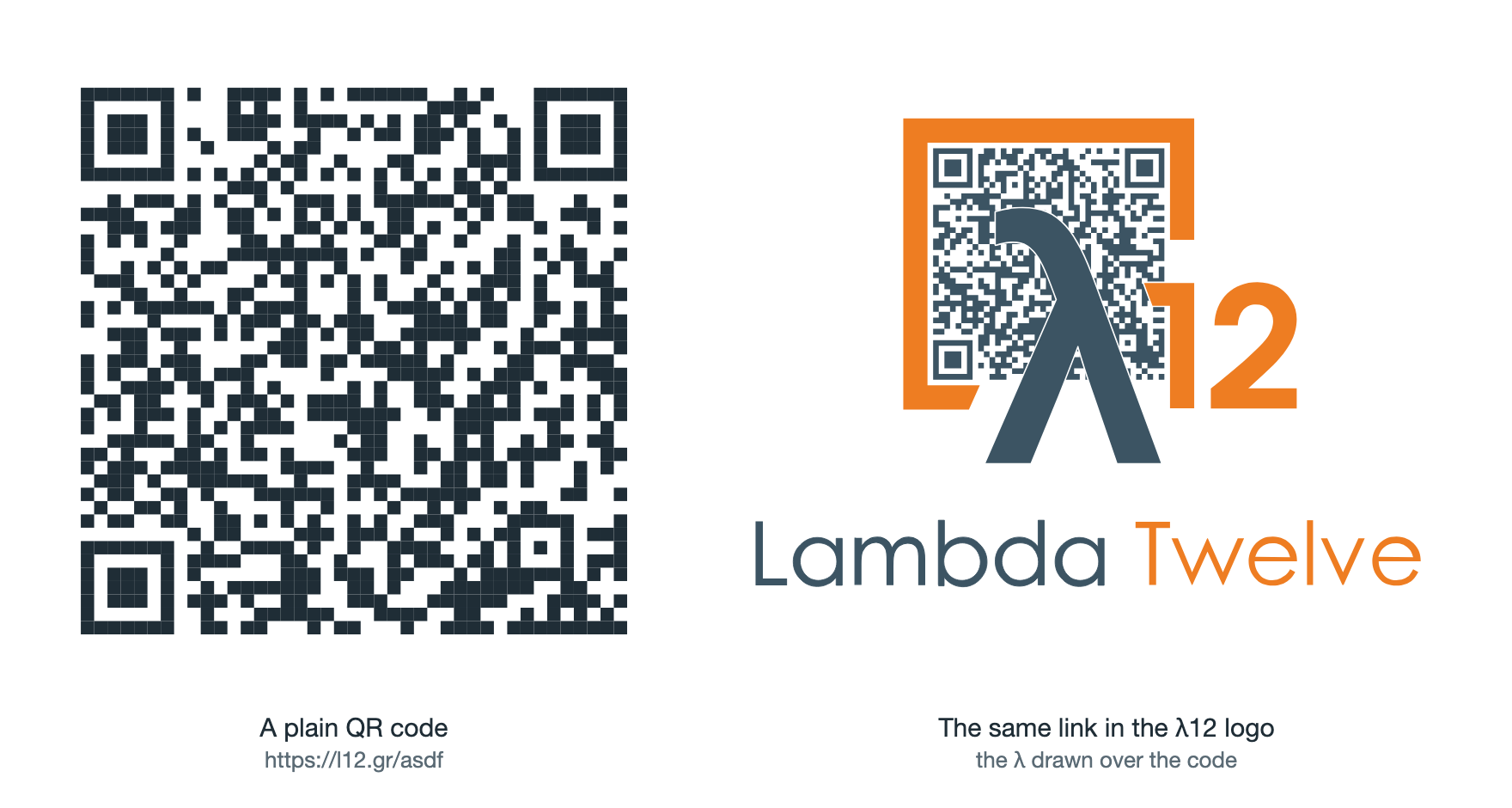
The result is a QR code that lives inside the λ12 logo, with the λ drawn right over it. The λ hides almost a quarter of the dots, and phones still read it.
The surprising part isn't that error correction saves it. It doesn't: an ordinary QR code with the same λ on top can't be decoded. Here's what does work, and why.
How much does the λ hide
The logo is a square orange frame with a big λ and a small "1" inside it. We put a 41×41 QR code (version 6) in the space inside the frame and drew the λ and the "1" on top of it. We didn't shrink the logo to make room.
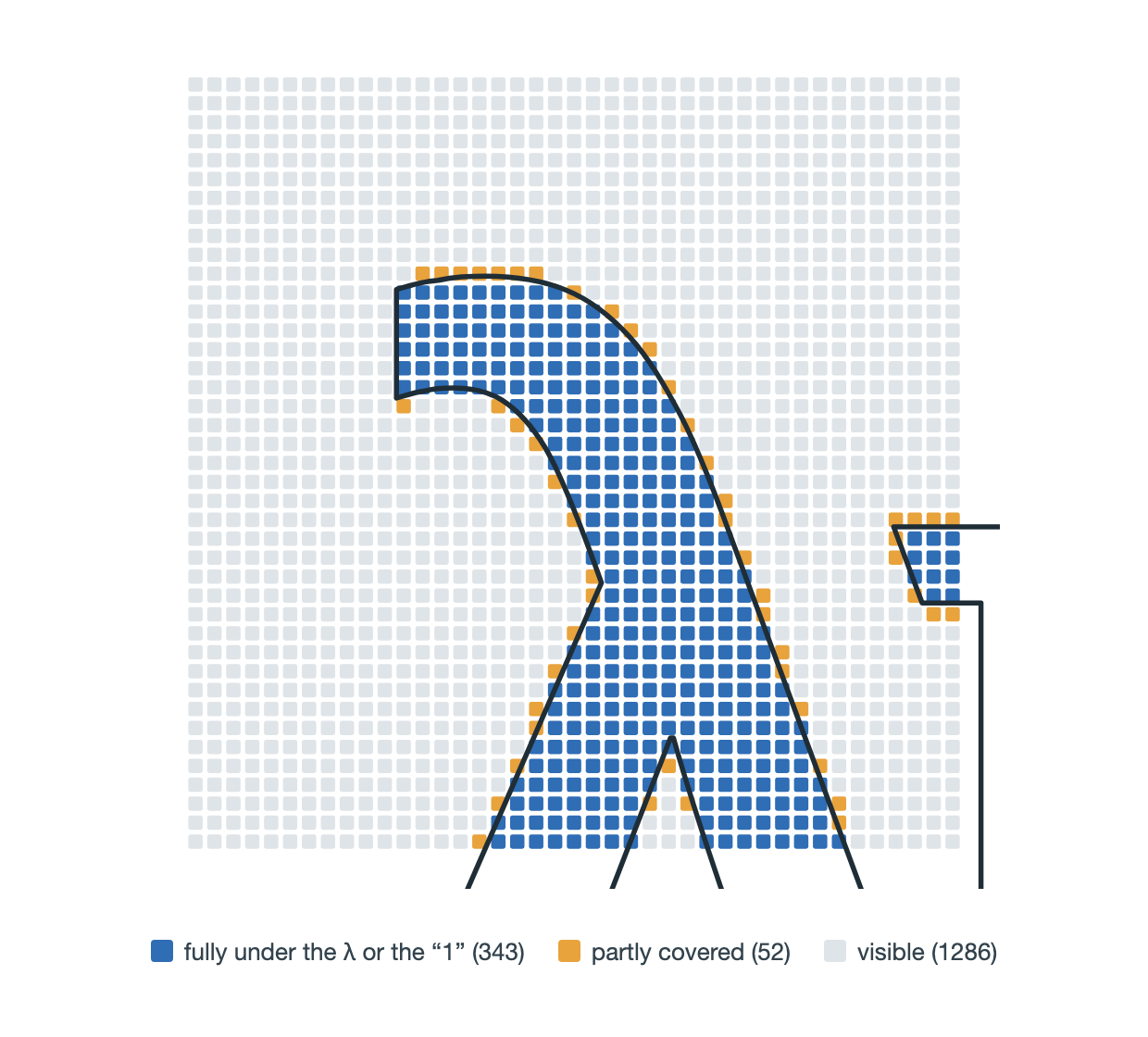
This is how much of the code ends up behind them, measured on the generator's own rasters:
| What | Covered | Share |
|---|---|---|
| All modules (the code's "dots") | 395 of 1,681 | 23.5% |
| Modules that carry data | 390 of 1,376 | 28% |
| Codewords with at least one covered module | 62 of 172 | 36% |
The last row matters most. A QR code stores bytes, called codewords, spread over the grid in a zigzag. If one bit of a codeword is wrong, the whole codeword is wrong. So the λ covers about a quarter of the area, but it damages over a third of the bytes.
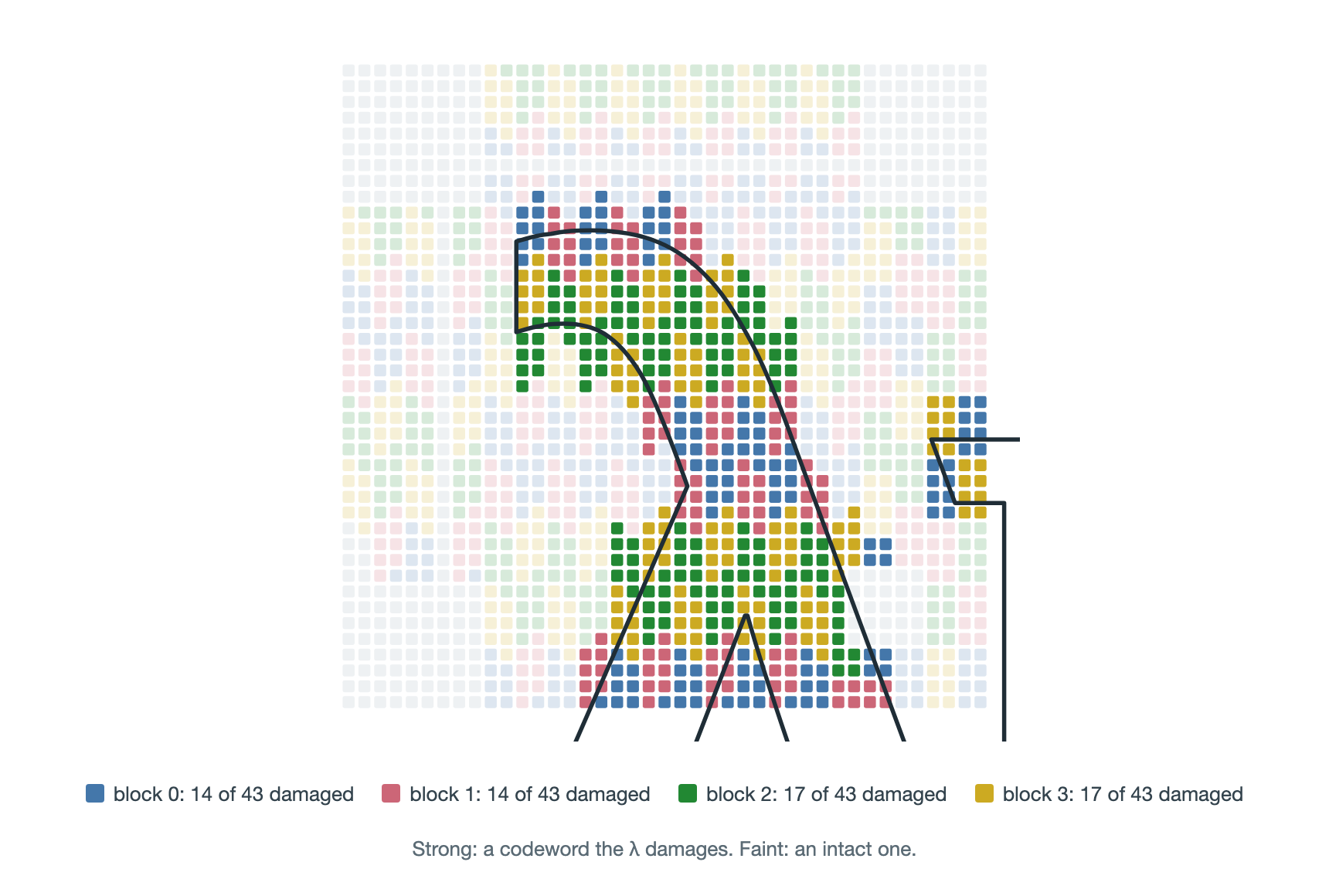
Each colour is one of the code's four blocks (more on those next). Strong colour means a codeword the λ damages. The blocks' bytes are interleaved across the grid, so the λ damages all four at once.
The finder squares in the corners and the timing lines stay visible: the λ only touches 5 of those fixed modules. That matters, because a scanner can't locate a code without them.
Why error correction alone isn't enough
You'll often see the highest error-correction level, H, summed up as "about 30% error correction". That doesn't mean you can safely cover 30% of a QR code's area. The QR standard, ISO/IEC 18004, counts that capacity in codewords, and two details decide whether a code with a logo on it scans.
The code is split into blocks, and each block fails alone. A version 6-H code holds 4 blocks. Each block has 15 data codewords and 28 Reed-Solomon codewords, 43 in total. If any one block can't be repaired, the whole code is unreadable. So the damage has to be under the limit in every block, not on average.
The scanner doesn't know where the logo is. Reed-Solomon can rebuild 28 codewords per block if it knows which ones are missing (erasures). A camera doesn't know that; to the decoder a covered module is just a wrong one. Errors at unknown places cost twice as much, so the real limit is 14 bad codewords per block.
With ordinary padding, the λ damages 14, 14, 17 and 17 codewords in the four blocks. The first two sit exactly at the limit and the last two are over it. That code doesn't scan, whatever the mask.
The trick: make the hidden dots agree with the λ
A module under the λ isn't lost. The camera sees it as dark. If the code wanted a dark module there anyway, nothing is wrong. So the goal changes: we don't need to survive the logo, we need a code that is already dark where the logo is.
We can't change the link, but a QR code carries more than the link. https://l12.gr/asdf is 19 bytes. With its header and end marker it fills 21 of the 60 data codewords. The other 39 are padding: filler that readers stop before and never look at. The standard fills them with a fixed pattern, but any value works. That gives us 312 free bits.
Those bits reach further than their own bytes. Each block's 28 Reed-Solomon codewords are computed from its data, so changing a padding byte also changes error-correction bytes. That's what lets us fix codewords the padding doesn't hold directly.
The key fact is that all of this is linear over bits. Reed-Solomon is linear, the mask is an XOR, and the zigzag placement just moves bits around. So each module is a fixed base value XOR some combination of the 312 free bits. To find which combination, the generator encodes the code 312 times, flipping one free bit each time, and records which modules change.
Each covered module then becomes one equation: "this module should be dark". The generator solves them with Gaussian elimination over GF(2), the arithmetic of single bits, one whole codeword at a time. A codeword is only accepted if all of its covered bits can be satisfied, because a byte with seven right bits out of eight is still a wrong byte. Codewords with the fewest covered bits go first, since they are the cheapest to win.
The idea isn't ours. Russ Cox described it in 2012 as QArt codes, which use the same linear algebra to draw pictures out of a QR code's own modules. We use it the other way round: the picture is already there, drawn on top, and the solver makes the code agree with it.
It doesn't fix everything. Block 1 has only 9 padding bytes, because the link spills into it. Block 0 has none: it holds the start of the link, so none of its bytes can be chosen and its 14 damaged codewords stay damaged. Blocks 2 and 3 are pure padding, and that's where the solver does most of its work.
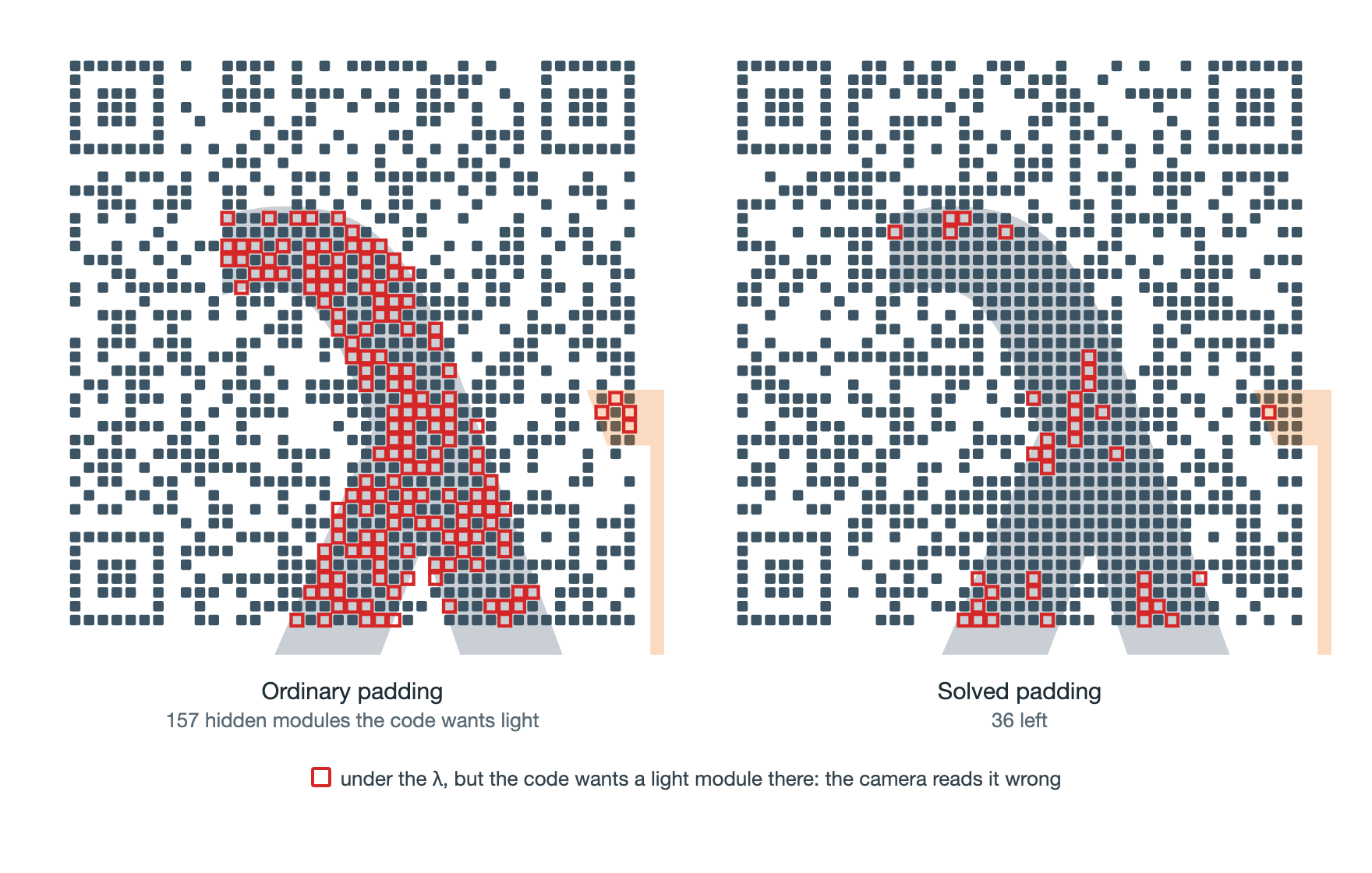
An X-ray view: the λ made see-through. A red square is a module under the λ that the code wants light, which a camera will read wrong. Solving the padding takes these from 157 to 36.
The result, block by block
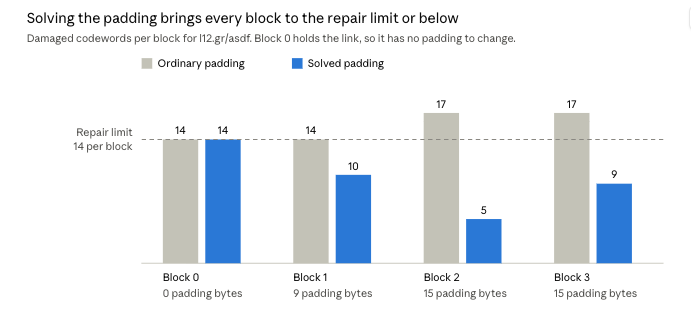
The solver pulls the two blocks that were over the limit well under it, and gives block 1 some room. Block 0 can't move, and ends exactly at 14. On paper that's the edge, but it's a worst case: it counts every half-covered module as wrong, and a camera reads some of them right. That's still not proof, which is why every code is scanned before anyone sees it (more on that below).
The details that made it work
The algebra is the clean part. Getting it to scan took a handful of smaller decisions, most of them found by trying.
- Measure the logo as a browser draws it. The generator doesn't guess which modules the λ covers. It uses rasters of the logo that headless Chrome rendered at 2,268 px, and measures each module against them. What the solver believes is what a screen actually shows.
- Half-covered modules count as lost. 52 modules are only partly under the λ. A camera could read them either way, so the generator treats their codewords as damaged no matter what it picks. They're a big reason block 0 sits right at the limit.
- A thin white gap around the λ. Dots that touch the λ blur into it, and the letter loses its shape. A white outline a quarter of a module wide (about 1 px at 600 px) keeps the λ readable to people and the dots separate for cameras.
- Try every mask, and more than one ordering. QR codes have 8 masks that XOR a pattern over the data. The generator tries all 8, each with 12 orderings of the codewords, against two kinds of target (dark shapes only, or shapes plus the light gap). That's 192 candidates, ranked by their worst block.
- Stay at version 6. A 45×45 code (version 7) has smaller dots and more room, but it passed fewer of our stress tests. The 41×41 code was the one that held up.
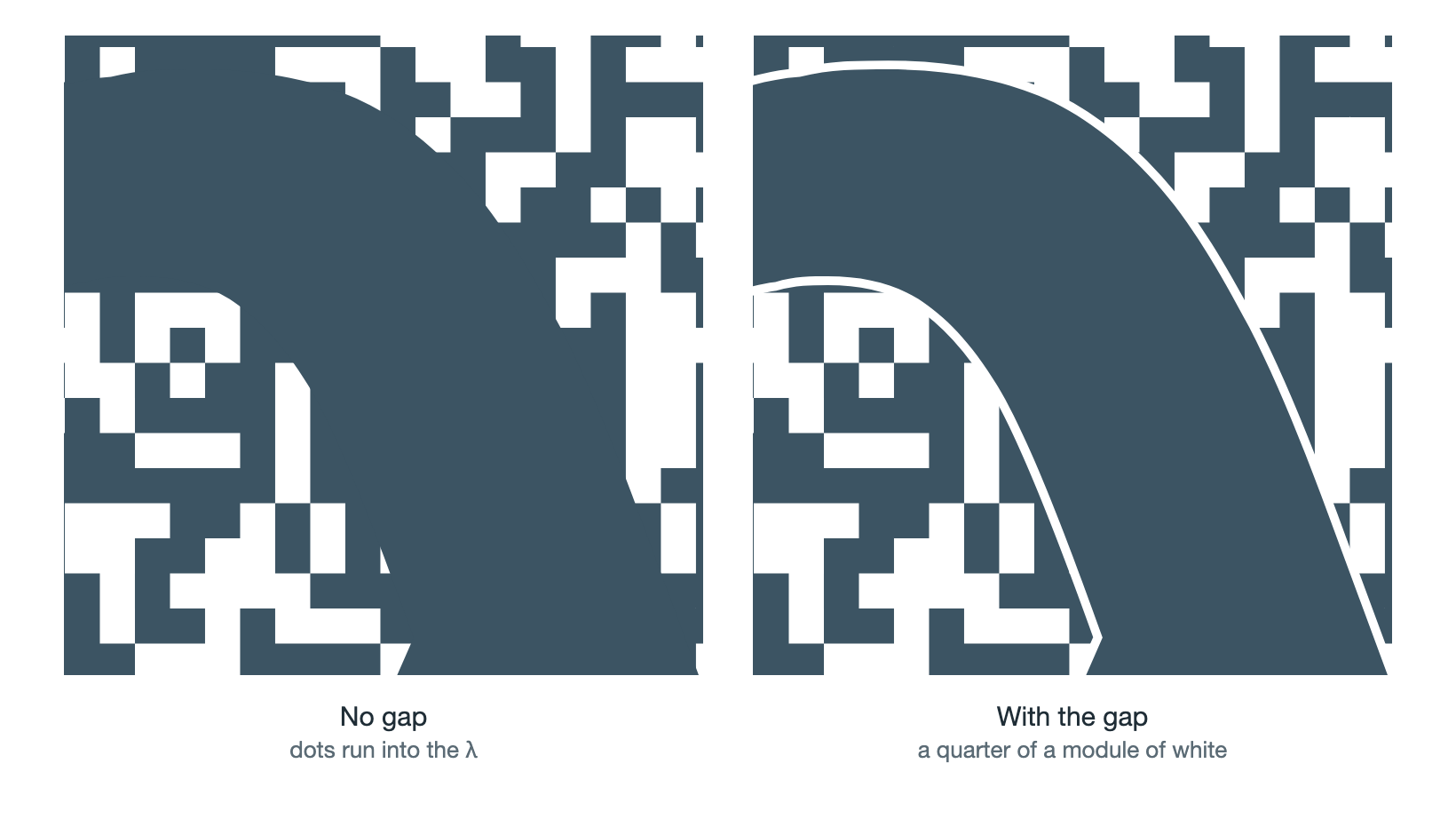
The top of the λ up close. Without the gap (left) the dots merge into the letter. With it (right) the λ keeps its shape.
Trust, but scan
A code that is fine on paper, with one block exactly at its limit, isn't a code you print. So the generator never returns a code it hasn't read back itself.
Each candidate is rendered and handed to two decoders. ZXing has to read it seven ways: sharp, shrunk to a half and a third, blurred twice, and skewed in two perspectives, like a phone held at an angle. OpenCV's detector (QRCodeDetectorAruco) has to read the sharp version too. The first candidate that passes everything is the one you get. If none pass, the admin refuses and asks for a different code, rather than handing out a logo that might not scan.

The seven checks for l12.gr/asdf, each decoded for this image. All seven read.
The automated checks passed for 41 out of 41 random 4-character codes. On real hardware, the first version was scanned on three phones, and l12.gr/bgt3, our first real link, scanned fine from the live admin on 29 September 2026.
Because phones are the real test, a unit test pins the exact SVG for https://l12.gr/asdf by its hash. If a change to the code or a library changes that output, the test fails. The rule is to scan again on phones, not to update the hash.
Limits
The trick runs on padding, so it only works while there's padding to spend.
- Short codes only. Every extra character in the link takes a padding byte away. The admin allows a logo only for codes of 4 characters or fewer. Longer ones sometimes pass the automated checks, but we haven't tested them on phones.
- One pattern per link. The dots are solved for each link, so every short link gets its own logo file.
- Light backgrounds only. Many phone scanners can't read light dots on a dark background.
- Not too small. About 200 px wide on screen, or 8 cm in print. Scan a test print before a large run.
That's the whole idea: don't fight the logo, recruit it. The λ stays where the brand needs it, and the bytes nobody reads are chosen so the dots behind it tell the truth.
Further reading
- ISO/IEC 18004:2024, the QR code specification.
- Thonky's QR code tutorial: encoding, padding, blocks, masks and placement, step by step.
- Creating a QR Code step by step, Nayuki's interactive walkthrough.
- Reed–Solomon error correction: why errors cost twice as much as erasures.
- QArt Codes, Russ Cox, 2012: the linear-algebra trick this builds on.
- zxing-cpp, the decoder the generator checks every code with.